Category: DM Tools
Freesound.org – sounds for your game
A while back I linked a gaming site that had various MMO soundtracks you could download. They had a pretty nice selection and found a few tracks that would work well for some background music to my sessions. I used to shy away from having music for my games. However I found with a decent mix you could get something playing in the background on a loop adding a little flavor to the game, and still not make it a distraction to what was happening around the table.
A few months ago I ran a Savage Worlds game for a local con. Being a demo game with new people, I really wanted to add something to the session to make it stand out. Normally I’m not one for sound effects. However for a few key points in the game, I wanted to add something to make it more of an engaging experience. As it was a horror sci-fi game, I also wanted some type of ambient noise to get everyone in the mood. Having a MP3 player and a miniature speaker, I could easily get something portable up and be able to play some tracks without it being too fiddly and taking up a bunch of space on the table.
So I needed to try and pick up some sounds. I stumbled across Freesound.org and fell into the rabbit hole of creative commons sound files. A bit of digging and I was able to find that perfect space ship alarm. There were tons of industrial and factory sounds. You can really find some wonderful ambient stuff. As for my sci-fi horror game, I settled on a few and also threw in a particularly longer ambient music track that was perfect for setting the mood.
The tracks are free, but many require attribution if being used in other projects. Consider throwing a bit of money to the site also as a donation. There are some nice tracks folks have made available. As for me, I am certainly going to be mining this for certain games. I simply cannot see running a horror game taking place on a dark and stormy night without using this site for some needed atmosphere.

Savage Worlds player cheat sheet
 Just a short post today. A long while back I prepared these cheat sheets for my players when we started up Savage Worlds. I just wanted a quick reference for them to cover much of the nuts and bolts of the game, without them having to rely on constantly looking stuff up in a book.
It’s a pretty simple sheet but my players have found them handy. I opted to print them out at half the size and laminated them for resisting your typical table of snacks and drinks. The text is a bit small but readable and the smaller page size helps keep less clutter around the game table. Enjoy!
Improvising 4E encounters
At first I was a bit hesitant about creating encounters on the fly for 4E. I slipped into this mindset about planning everything out. While I still feel combats in 4E worked much better as set pieces, at times PCs might go off into another completely different direction. When they did that, I felt combat likely shouldn’t be an option as I just wasn’t comfortable enough creating something up on a whim. I wasn’t sure if it would be challenging enough (or too difficult).
What I failed to notice was that the monster math in 4E was very open to DM. It just took some effort to sit down and work it out per level. It was deceptively hindering at first but when you really looked at it, you saw how simple and elegant it was.
Then there was the Sly Flourish DM sheet, where the guy did what we all should have done at the beginning, just create a spreadsheet that does the math and print it out. Granted this was using adjusted HP and damage with the ‘updated’ monster stats, but it laid out how simple creating monsters were.
The DMG did have a similar table but required a little calculation. Still if the effort was made, you could instantly create a challenge appropriate fight for PCs. All that was needed were a few keywords for damage types and you had the core of an interesting monster.
I really think one of the biggest flaws in presenting 4E was not including a fully sketched out table like this. Also not really providing more monster themes was another failed opportunity. Maybe they wanted to hide how easy this all was. That in a flash, you could make up custom monsters with damage, HP, attack bonuses, and defenses that would be level appropriate.
Honestly, I’ve found the openness of the entire nuts and bolts of the game refreshing. You could pull things apart, cram things together, and 9 times out of 10 it would work fine. The elegance in being able to quickly create encounters just worked so well. It’s something few folks are willing to admit, that 4E gave the DM a lot of tools and freedom to make really cool stuff. I don’t think I ever really bothered making up custom monsters with older editions like I did with 4E. Best of all was that it worked very well.
Sadly I don’t think this was ever really explored more, and I wish more emphasis was placed on the DM taking stuff like this and running with it. While it was great having pre-made monsters and traps the idea you could whip up your own in a snap should have been promoted more. It’s one of the elements of 4E that made it my favorite edition.
Obsidian Portal Kickstarter wrapping up
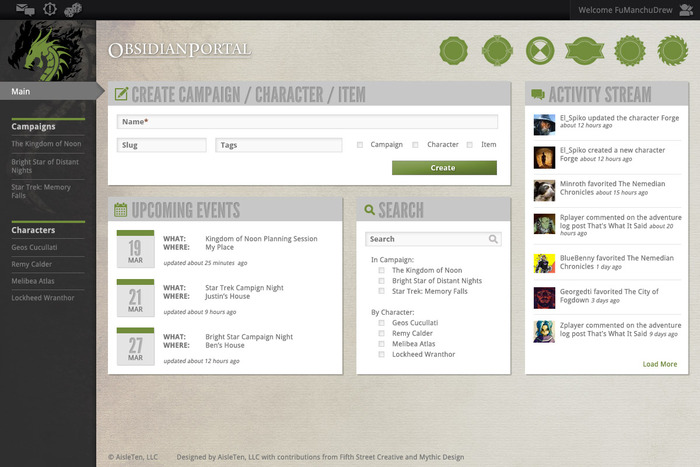 |
| A possible dashboard layout. Spiffy! |
I’ve frequently gushed on this blog how much I love Obsidian Portal. In fact, I’ve been a fan of the site for a long time. It’s been very functional over the years however I understand the people running it really want to give it a face lift.
A Kickstarter campaign is wrapping up in a few days. Fortunately, they’ve made their funding goals and then some. I’ve been a freebie user for a long time and I appreciate Obsidian Portal allowing that. If you aren’t a regular subscriber to their system this kickstarter is a great way to support the site.
So I hope folks are willing to send a few dollars their way. The project is funded. It’s a nice way to thank them for all the support they give to the gaming community. There are only 5 more days until the campaign ends, so if you are inclined be sure to support it soon.
Free MMO soundtracks for your game
I never really was into having music in the background while I play RPGs. However it’s something I’ve begun to dabble in. I don’t go for making a specific playlist. Rather I started using soundtracks. I can typically just put it on a loop without having to worry about the music being a hindrance to play.
MMO soundtracks are pretty good sources for background music, and one of my favorites of late has been the Age of Conan Soundtrack. It just fits my Savage Worlds hack of Dark Sun very well. Just the right touch to give the session a little ambiance and not be too distracting.
Massively is a MMO news site that recently posted a gold mine of links for free MMO soundtracks. It’s a bit of a pain to go through as many are individual tracks. However I think you can easily have a ton of tunes to mix and match for your game. The links likely cover a pretty wide spread of ‘sci-fi’ themed stuff to your typical fantasy music. Hope folks find this useful for their games.
Creating dungeon tile maps with Pymapper
I’ve picked up dungeon tiles but haven’t been utilizing them much in my game. One of the nagging points was being able to effectively sketch out a map while planning an adventure. I’ve got a fair number of tiles, printed on both sides, and even if sorted into different containers I’d need to spread out almost the entire lot to fully see my options.
Additionally I’d need the tiles recorded somehow before playing to quickly get them on the table. It’d be best to have them put aside and be ready at a moment’s notice, but I don’t have the table space in my household to do that. Not to mention reusing some tiles as I don’t own multiple sets. I think a snapshot with a digital camera would work, but still somewat a convoluted solution.
Enter the free program, Pymapper. This handy mapping program allows me to easily move tile sets around on a gridded area. I can limit my selection to tiles I own, and even allow for duplicate sets. It keeps track of tiles I use (effectively removing them from the pool of tiles available). Best of all I can see all the tiles from each set I’ve chosen, improving my selection of tiles for an encounter map.

Finally, I can export the image in a few graphic formats (including your handy JPEG). So I can print out a hard copy if needed, or plop it down into a document file. There are some nice options to alter the background also if I want something a little more fancy. A neat feature if I wanted to hand out a player map as a prop.
There are some other nice features, including being able to add map icons representing monsters and other notable items. A fair way to record everyone’s position at the end of a night if you’ve got to wrap up a game in the middle of a fight. You can add simple annotations to a map (or link it to a text file for more detail if needed). You can stack tiles which is very nice for the more set piece tiles like pits and statues. Creating a group of tiles of a specific size, you can also make a set of geomorph tiles. Using this set you can quickly generate a random dungeon which is another very nice feature (plus they have some pre-made geomorph sets available).
Lastly, there are a group of tile set files that you can download. While I’ve messed around with some other encounter builder programs that allowed me to make maps, getting the tile sets was a bit of a chore. It’s nice that this program has them available.
Pymapper is not perfect. Moving tiles around once they are on the map can be a little clunky at times. However I’ve found the program very intuitive, and after learning 2-3 keystroke shortcuts and menu icons, I was able to select (and exclude) groups of tile sets, and whip up a few maps with stacked tiles very quickly. Best of all, I could export these maps and print them out, so I’d have a handy reference to help arrange the right tiles needed for an encounter during a game. Pymapper is a great little program and free of charge. Be sure to check it out.
Fiasco setup cards
I’ve always been a little intrigued by Fiasco but never quite got the gumption to pick it up. Catching the most recent Tabletop episode by Wil Wheaton definitely perked up my interest more. Once I get a few games under my belt I’ll likely throw up some thoughts. It’s taken me a few read throughs, but I’ve come to appreciate how elegant the game is.

Interestingly, getting folks from other cultures into the mix might be a bit of a challenge. My wife is a fan of many films by the Coen brothers and would likely get the vibe of Fiasco. However trying to describe your typical American small town suburb environments and inhabitants will likely garner some blank stares. I might have to tweak a playset to something with a hint of Asian trappings for it to be more recognizable if she wants in for a game.
One thing I wanted to do was speed up the setup a bit. I like the simplicity of using index cards, but I think having a few sheets of paper that could be filled in and quickly cut apart might be more serviceable. For some additional durability, I’ve been considering using self laminated sheets and dry erase markers too. I whipped up a PDF for some setup cards that can be printed out. There are 3 sheets, some name cards that can folded in half, a sheet for relationships (one too many for a standard game, but figured an extra wouldn’t hurt) and another covering a location, need, object, and 2 tilts. I also have some blank ones as wild cards for extra elements, just circle which one is represented (need, object, etc.).
Hope folks get some mileage out of them.
Virtual tabletop roundup
I’ve not used virtual tabletop software in my games. I’m a sit-around-the-table kind of guy. However I have to admit the sheer connectivity via skype and google hangouts is drawing me towards possibly looking at running online games. I think for 4E tabletop software there are some kinks to work out. However stuff I have thought about before will likely never see the light of day given the edition change coming.
I’m curious how the development of the official DDI Virtual Tabletop will go. Sadly, I guess the 4E support for that will evaporate. But with a looser, gridless system possibly in the works for DnDNext, this might get more support. Dread gazebo put up a nice old beta tutorial on his blog.
There are some other paid versions out there like such as the one at Fantasy Grounds. I’ve heard some give the software positive reviews and it looks pretty nifty. Typically I shy away from trial versions, but I might give this a spin. They also seem pretty committed to updates for the program too.
While possibly not as full featured as others out there, you’ve got Map Tool which is free. A bonus in my book as you can try it out without having to worry about any hassle with a trial version. I understand quite a few folks have used and enjoy this for a while now.
Something else on my radar has been the Roll20 Virtual Tabletop. A few things I like is that it is web based. Also while the program is geared for 4E, it is also system neutral. A plus with the new D&D playtest on the horizon. They’re currently in closed beta, but I’ll be keeping an eye on how they progress. It seems to have some potential.
EDIT: As expected I just scratched the surface. There are a few other programs out there that folks have brought up. I’ll just provide a list of the links here:
Gametable Project – a java opensource program
Tabletop Forge – that utilizes Google+ hangout
d20 Pro – a paid program but has a 30 day free trial
Using monster templates and themes
I’ve taken a stab at using the DDI monster builder and found it a little clunky but serviceable. However I still was looking for offline tools that would allow me to tinker with making custom monsters. Another resource out there, straight out of the DMG, were monster templates and themes.
I tend to think monster templates and themes never really got any ground with DMs. It’s a clever idea. You’ve got a few key characteristic powers and traits you can slap on just about any monster and end up with a custom creature. The DMG2 expanded on this and gave some more general powers based on the role of the monster. Even an article or two in Dungeon magazine had a few templates (#190). One hiccup however with using templates (or themes) was that some of the earlier ones didn’t scale too well in level.
There was a workaround to this as the math for setting damage, defenses, and to hit bonuses were readily available. So with a little work, you could tweak the powers to make a level appropriate creature. This is one great thing about 4E, a lot of the numbers behind the scenes in the design were freely accessible, allowing for tinkering that made it difficult to break the game.
Enter the DM Cheat Sheet over at Sly Flourish, offering the most handy table any DM would ever need. This breaks down all the bonuses and average damage for any monster, level by level. Granted you could figure all of these values out, but looking it up on a chart makes the process tons easier. Not to mention the chart has been adjusted to the ‘new math’ for monsters, making them more on par with the PCs.
What is really great about this chart is that it makes some of the monster templates more flexible (especially many in the DMG2). The listed damage in these templates can be altered to reflect something more appropriate for that monster level. This also works wonders for creatures in the monster manuals. I can switch out the attack bonuses and damage with expected values for that monster level, and create a creature that can provide a sufficient challenge to the group.
Now, I’ve got a handy means to make some unique monsters on the fly. If I need to create some ice demon cultist group, I can switch out a few keywords and swap particular defences, HP, and damage output, making something that I am more confident will not TPK my players (or be a complete pushover).
Take Lolth’s Chosen from the DMG2 for this imaginary ice demon cultist group. You could drop out the poison keyword for many of the powers and use cold instead (imagine a biting, icy, cold spreading across the player’s body when they are hit). The cloud of darkness power could be described as a blast of hurling snow, which blinds the players. Scuttling escape could mean the ground is suddenly covered with a sheen of thin ice that the monsters could freely shift through. Not all the powers in the theme match, but with a little wrangling you could give your monsters a few custom powers making them stand out.
It’s too bad this hasn’t been explored more as articles in Dungeon. Having a greater variety of templates and themes offering different powers, particularly for certain monster roles and minions, would be a nice set of tools for that DM looking to spice up their game. Still, altering customizing monsters is a little less nebulous with 4E and a snap to do using themes and templates. I encourage folks to try it for their game.
Secret Santicore 2011 is available
Zak S., the guy that runs Playing D&D with Porn Stars, came up with a pretty nifty idea. Send in a generic D&D campaign idea and roughly how many pages you’d take up in a publication. A raffle for slots would be taken up. The winners would be notified and then have until the 3rd week of December to submit their material. It would be packaged up in a nice pdf and be available for free.
Secret Santicore is out and available at Giblet Blizzard. Most of it is geared towards OSR, but a good chunk is fairly system generic. And I dare say about 99% of the book could work with a 4E game with a little elbow grease. It has a ton of ideas, tables, and fodder for your game. Not to mention an old pal of mine that runs the excellent blog, the Fearless DM, has got some of his stuff in there.
I salute the guys and gals that got this together. You all did a fantastic job and nod to Zak S. for coming up with the idea. I’ll have to try and get into this next year if folks consider doing another one.
 Geek Ken